
withsol 算子的应用示例
withsol 算子支持用户从当前模型的任意求解器序列中提取解,并用于其他研究或结果后处理。
比较两个研究的结果
我们来看一个简单的传热案例:对一个左侧温度为 20ºC 的正方形进行稳态仿真。在模型中运行两个研究,一个研究中正方形的右侧温度为 100ºC(研究 1),另一个右侧温度为 200ºC(研究 2)。为了计算这两个研究之间的温度差,我们可以使用 withsol 算子。
withsol 算子的基本形式是: withsol('tag',expr),其中 'tag' 是要从中提取解的求解器序列的标记, expr 是要求解的表达式。要查看标记,可以在 模型开发器 窗口顶部的 模型树节点文本 菜单中选择标记,每个节点的标记都会出现在节点名称后的大括号 {} 中。
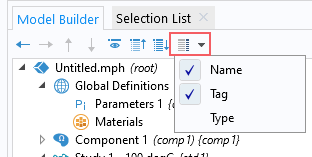
启用了 名称 和 标记 选项的 模型树节点文本 菜单。
为了查看 研究 2 和 研究 1 的温度差,我们使用表达式 T-withsol('sol1',T) 为研究 2 的数据集生成了一个绘图。
 A screenshot of the model tree, with the Solution 1 and Surface 1 nodes highlighted, and the Surface Settings window with the withsol Expression highlighted.
表面 绘图节点表达式中使用的算子,用于定义第二个研究与第一个研究的解之间的温度差。
A screenshot of the model tree, with the Solution 1 and Surface 1 nodes highlighted, and the Surface Settings window with the withsol Expression highlighted.
表面 绘图节点表达式中使用的算子,用于定义第二个研究与第一个研究的解之间的温度差。在该表达式中,withsol 算子外的变量 T 取自 研究 2 自身(标记为
'sol2'), 而 withsol 算子则取自 研究 1(标记为 'sol1')。 结果绘图显示了整个域的温度差,两个研究中温度相同的地方,温差为 0。
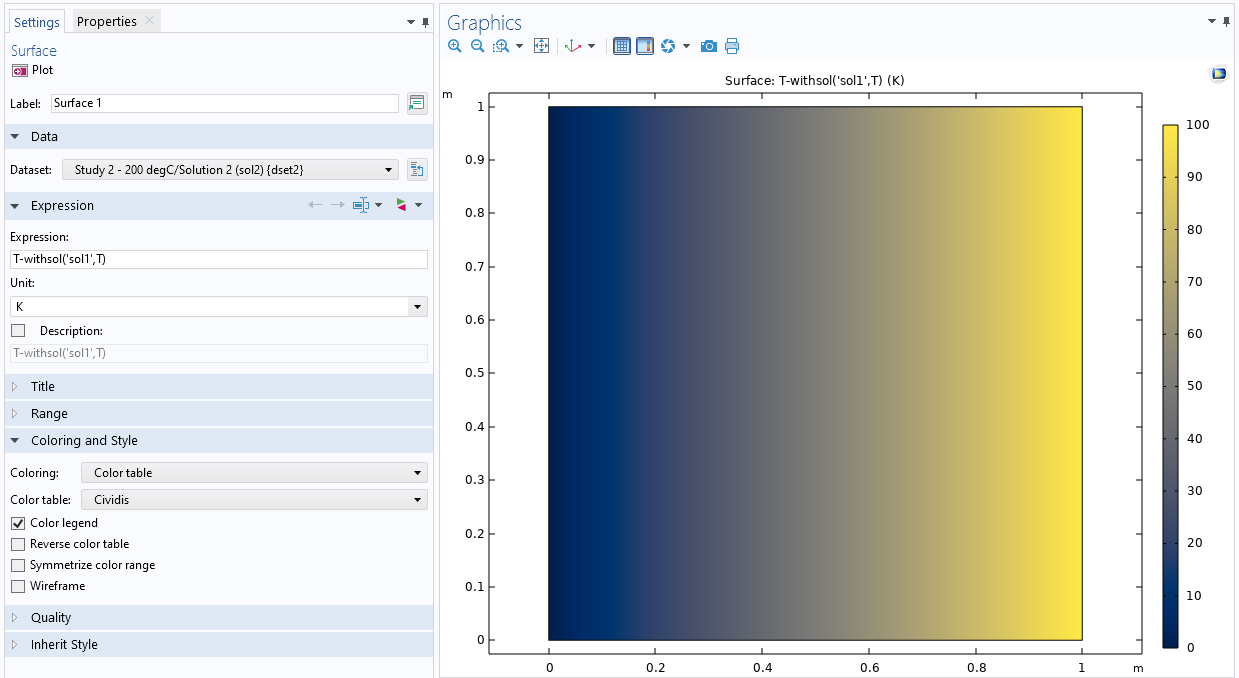 A screenshot of the Surface Settings window on the left and the Graphics window with a temperature plot on the right.
其中一个 表面 绘图节点的设置、算子和使用情况,以及 图形 窗口中的绘图结果。
比较同一个研究中两个参数值的结果
我们还可以比较同一个研究中两个参数之间或瞬态研究中两个时间点之间的结果。在本文的示例中,如果不使用两个研究结果,而是只使用右侧带有参数化温度的一个研究结果,同样可以找到两个温度之差。不过,需要使用 withsol 算子的扩展版本,不仅要指定要从哪个解中提取结果,还要指定参数值。这时,算子的形式为:
withsol('tag',expr, setval(par,value))
式中,'tag',和 expr 与上文表述相同,setval(par,value) 是新加入的。setval 算子通常与 withsol 一起使用,用于指定参数 par 的值。
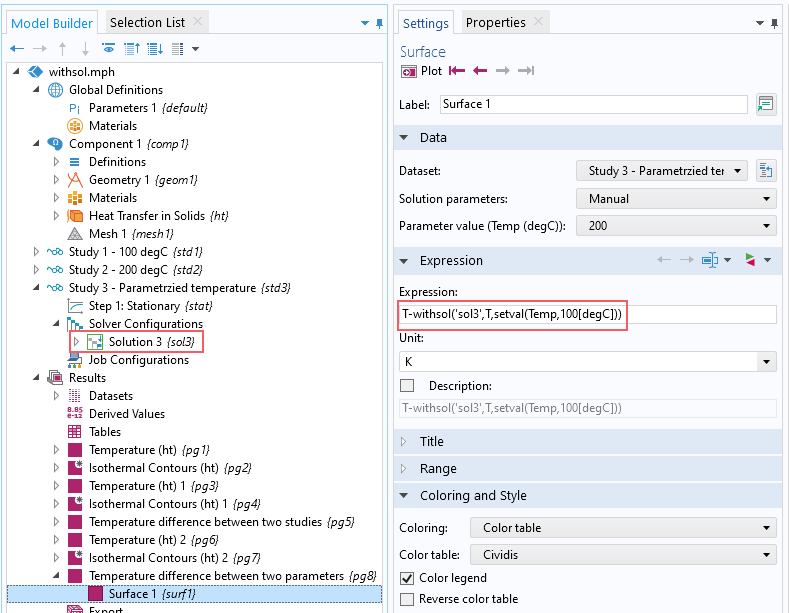 A screenshot of the model tree on the left, with the Solution and Surface nodes selected, and the Surface Settings window on the right, with the Expression highlighted and including the withsol and setval operators.
其中一个表面绘图节点的设置窗口,表达式中使用了withsol 和 * setval *算子。 研究 3 的解包含在表达式中,并在 模型开发器*窗口中突出显示。_
A screenshot of the model tree on the left, with the Solution and Surface nodes selected, and the Surface Settings window on the right, with the Expression highlighted and including the withsol and setval operators.
其中一个表面绘图节点的设置窗口,表达式中使用了withsol 和 * setval *算子。 研究 3 的解包含在表达式中,并在 模型开发器*窗口中突出显示。_
在这里,T 从绘图设置中获取,即 研究 3 和 200ºC 的参数值。withsol 算子从同一研究中获取变量 T 的值(标记为 'sol3'), 但参数Temp 为 100ºC,具体操作方法是使用 setval 算子 将参数 Temp 的值设置为 '100[degC]'。绘制的结果与上图相同。
请注意,虽然可以通过扩展使用上述 withsol 算子来实现这一目标,但我们还有其他更高效的选择。在比较同一解内的结果时,推荐使用表达式 at( 和表达式 with( 的 with 算子,因为不需要在不同的解/扩展网格之间进行映射,而只是从同一个解中的不同位置读取,所以这两种方法算起来会更快。此外,由于不需要知道解的标记,也不需要使用 setval 算子,因此所涉及的语法也得到了简化。
将一个研究的结果用于另一个研究
堤坝边坡稳定性, 模型计算了来自孔隙压力和重力的 原位 应力,并将研究结果用作计算安全系数的初始应力。使用 withsol 算子可以获取 原位 应力。
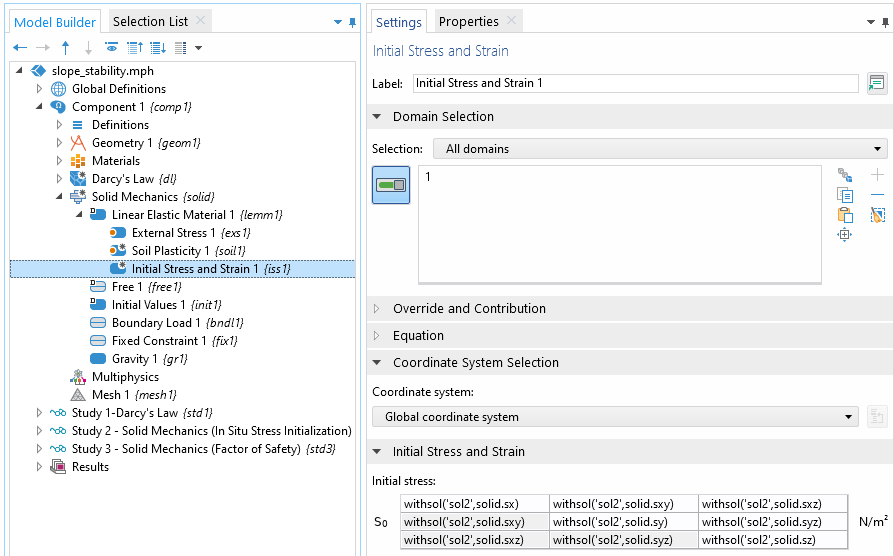 A screenshot of the model tree and Settings window for the Initial Stress and Strain feature.
使用了 withsol 算子的初始应力和应变特征的设置窗口。
A screenshot of the model tree and Settings window for the Initial Stress and Strain feature.
使用了 withsol 算子的初始应力和应变特征的设置窗口。
此外,还可以使用 setind 和 setval 算子作为 withsol 算子的附加参数,处理来自瞬态求解器、特征值求解器、频率扫描或对一个或多个参数的辅助扫描的结果。
setind 算子可以索引时域解、特征值列表、频率扫描或任何其他参数。正索引从列表的开头开始,负索引从列表的结尾开始。
例如,在处理时域解时:
withsol('sol1',expr,setind(t,1)) 将返回第一个时间步长,或者也可以使用 withsol('sol1',expr,setind(t,'first'))
withsol('sol1',expr,setind(t,2)) 将返回第二个时间步长。
withsol('sol1',expr,setind(t,-2)) 将返回倒数第二个时间步长。
withsol('sol1',expr,setind(t,-1)) 将返回最后一个时间步长,或者也可以使用 (t,'last'))
对于特征值求解,索引变量为 lambda, 而对于频率扫描,频率变量为 freq.
setval 算子则提取用户指定值的解,并在存储的时域解之间进行插值。例如:
withsol('sol1',expr,setval(t,0.5)) 将返回 0.5 s 时的解。如果在此时间点没有存储数据,则会从最近的存储时间点插值求解。如果存储的是如下面的瞬态 求解器 截图所示的时间导数,将使用时间导数进行插值。如果有时间导数,则使用 Hermite 插值,否则使用线性插值。如果指定的值超出时间范围,则使用最近的时间步长(第一个或最后一个)。
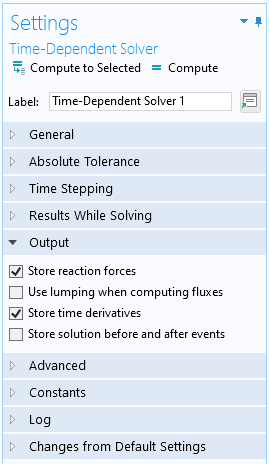
在 瞬态求解器 设置中,默认选项是存储时间导数。
与特征值解一起使用时,setval 算子将返回与实际特征值公差在一定范围内的解。例如,即使特征值实际上是 -100.01i,使用
withsol('sol1',expr, setval(lambda,-100i)) 也将返回这个解。
与频率扫描或辅助扫描一起使用时,必须指定频率或参数的精确数值。如果扫描多个频率和/或参数,可以向 setval 和 setind 传递多个参数,使语法更加简洁。例如
withsol('sol1',expr, setval(freq,60,param,5)) 等同于 withsol('sol1',expr, setval(freq,60),setval(param,5))。
withsol 算子的更高级用法
有关 withsol 算子更高级用法的示例,请参阅 支架-一般周期性动力学分析 模型。 您可以在结构力学模块的案例下载中找到此教程模型,文件如下:
- bracket_general_periodic.mph
- models.sme.bracket_general_periodic.pdf
在该模型中,withsol 算子用于从一个研究中提取与频率相关的载荷,并将其作为第二个研究中相应频率的输入。
请提交与此页面相关的反馈,或点击此处联系技术支持。


