
COMSOL Multiphysics® 中的几何概念和术语
无论您是在 COMSOL Multiphysics® 本地环境中构建几何模型,使用 LiveLink™ 产品,还是从外部程序导入 CAD 或网格数据,了解您的几何结构在软件中是如何分类的都非常重要,这样才能正确地对几何模型进行设置。了解 COMSOL Multiphysics® 中使用的几何术语也很重要,例如什么是 域 和 边界。在这篇文章中,我们将介绍在创建几何模型或对模型进行设置时会遇到的命名规则。
几何类型
在 COMSOL Multiphysics® 中,模型的几何结构各部分所用的术语在几何创建阶段、几何序列、物理场建模阶段,以及之后的各个环节都有所不同。在物理场建模阶段(例如,在指派材料属性、网格设置和物理场定义时),我们在软件中使用一些特定术语来指代几何结构,包括:
- 几何对象
- 几何实体
- 域
- 边界
- 边(仅限三维几何)
- 点
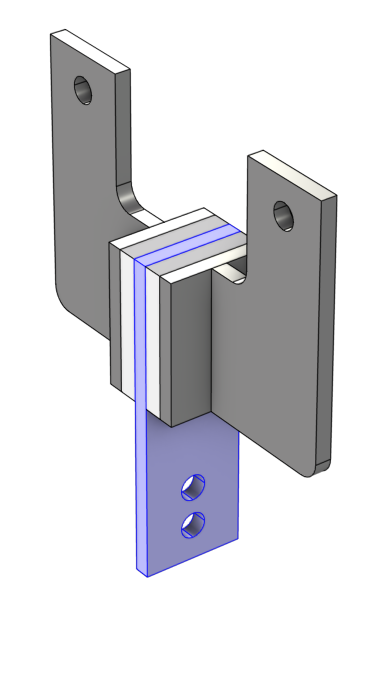
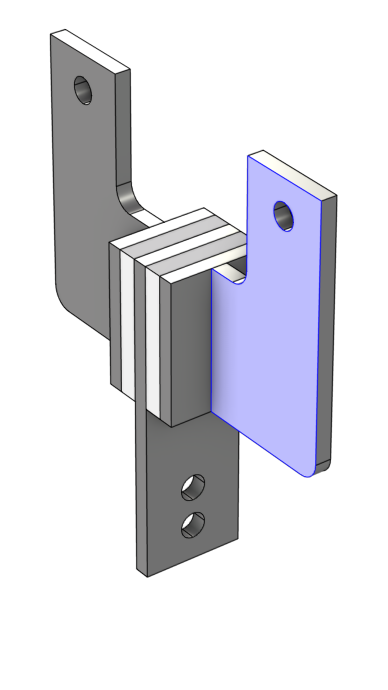
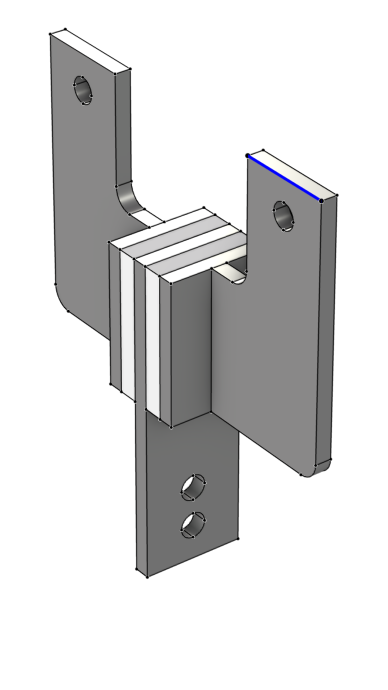
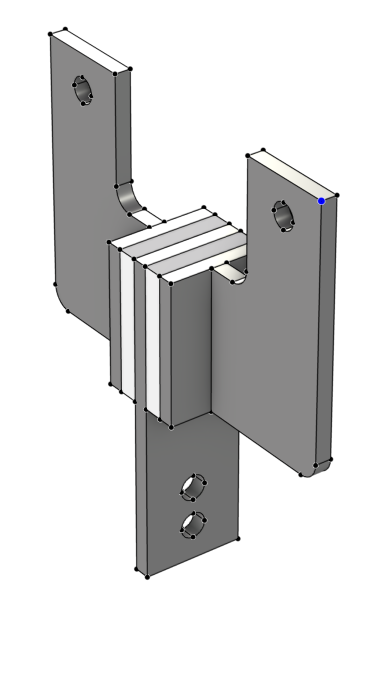
对于三维几何,最常用的术语是:由表面围成的体积构成实体,由边围成的区域构成 表面,由点围成的曲线构成 曲线 或 直线。COMSOL 的几何术语也同样遵循这一原则:对于三维几何,由表面围成的实体体积构成 域,由边围成的表面面积构成 边界,由 点 围成的曲线构成 边。以一个黏弹性阻尼器为例,在下表中对此进行了直观说明。常用的术语以及以蓝色突出显示的几何零件在 COMSOL 中的相应命名规则如下:
 |
 |
 |
 |
|---|---|---|---|
| 实体 (体积) | 表面 (面积) | 曲线 (长度) | 顶点 |
| 域 | 边界 | 边 | 点 |
请注意,在 COMSOL Multiphysics® 中执行几何建模步骤时,三维中的边界也称为 面,点也称为 顶点。
在 COMSOL Multiphysics® 中设置物理场时,域、边界、边和点称为 几何实体;几何对象 为几何实体的集合。我们将在后续章节中进一步解释这些概念。
几何对象
几何对象可以是实体、表面(仅三维)、曲线、点或混合(两种或多种类型的混合)类型,并包含域、边界、边和点等实体。但是,只有实体对象可以包含域。表面对象不包含任何域,即使表面形成一个不漏水的区域,但可以通过几何操作将其形成实体对象。
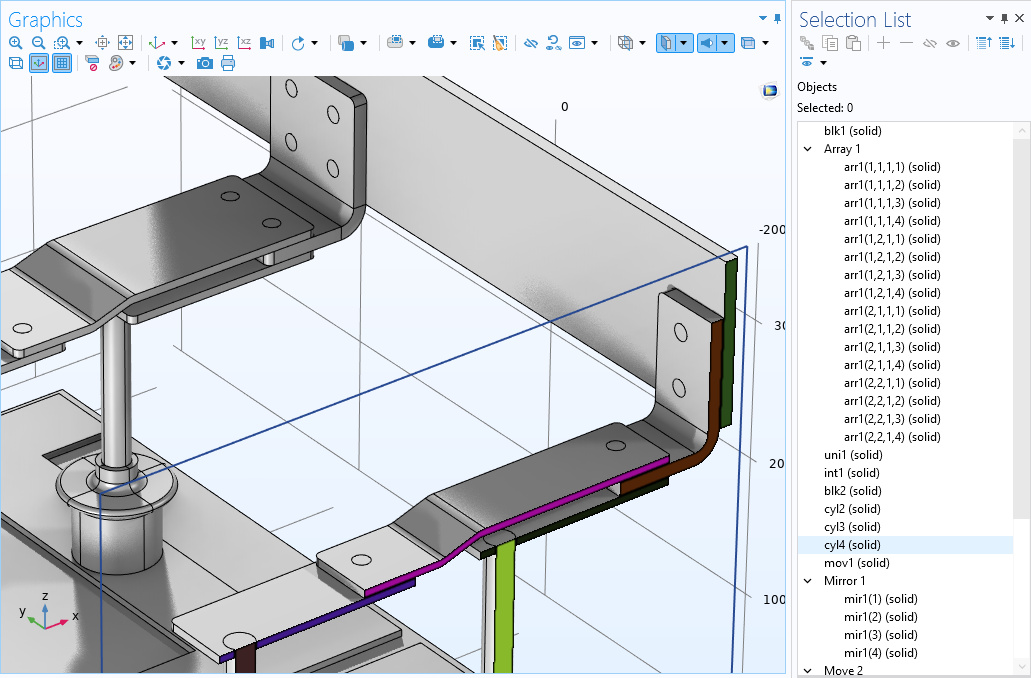
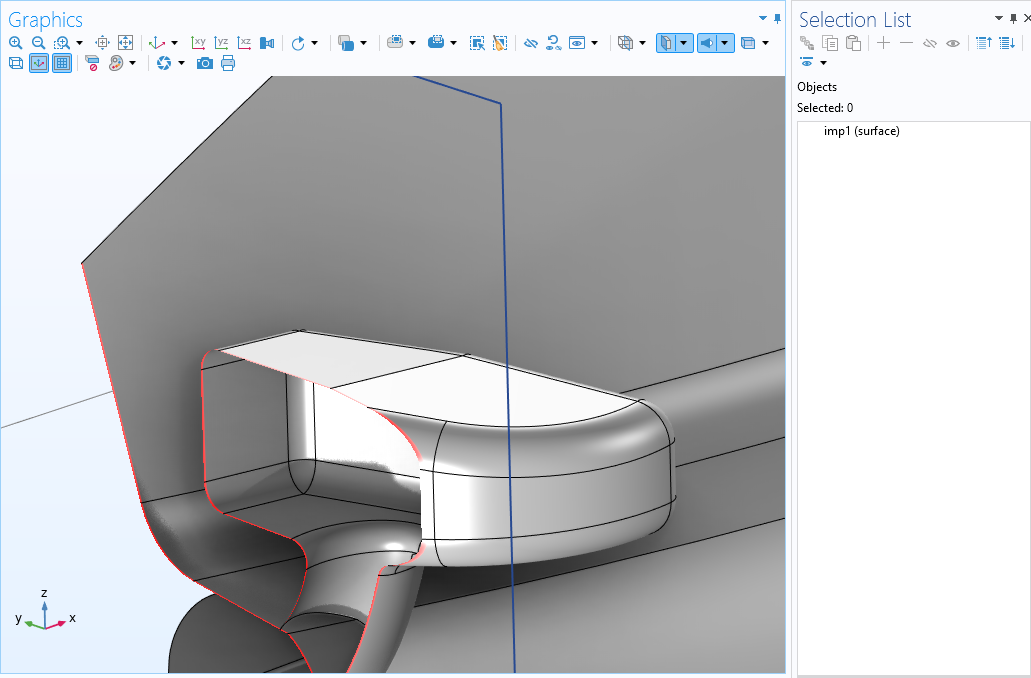 实体和表面对象的示例。剪裁平面用于显示对象的横截面。上图:母线板组件的实体对象包含域(此处着色提高可见度)。下图跑车的侧视镜是使用 壳 接口建模的,因此导入时是一个表面对象,包含一个封闭的空区域。
当我们在软件中讨论几何对象时,通常指的是构成该对象的几何实体的集合。当使用 几何 节点(也称为 几何序列)时,所有几何元素和操作均会输出几何对象。在几何序列之外工作时,我们指的是几何实体。
在 COMSOL Multiphysics® 中,一个几何序列可以包含一个或多个对象,一个更复杂的几何将由多个对象组成。在定义材料、物理场或网格设置之前,使用 形成联合体 或 形成装配 节点 确定几何。在执行 形成联合体 或 形成装配 操作时,几何序列及其包含的多个对象会自动联合成一个具有多个域的对象。因此,在 COMSOL Multiphysics® 中设置材料、物理场和网格时,即使几何由多个未连接的实体组成,我们始终使用一个工作对象。
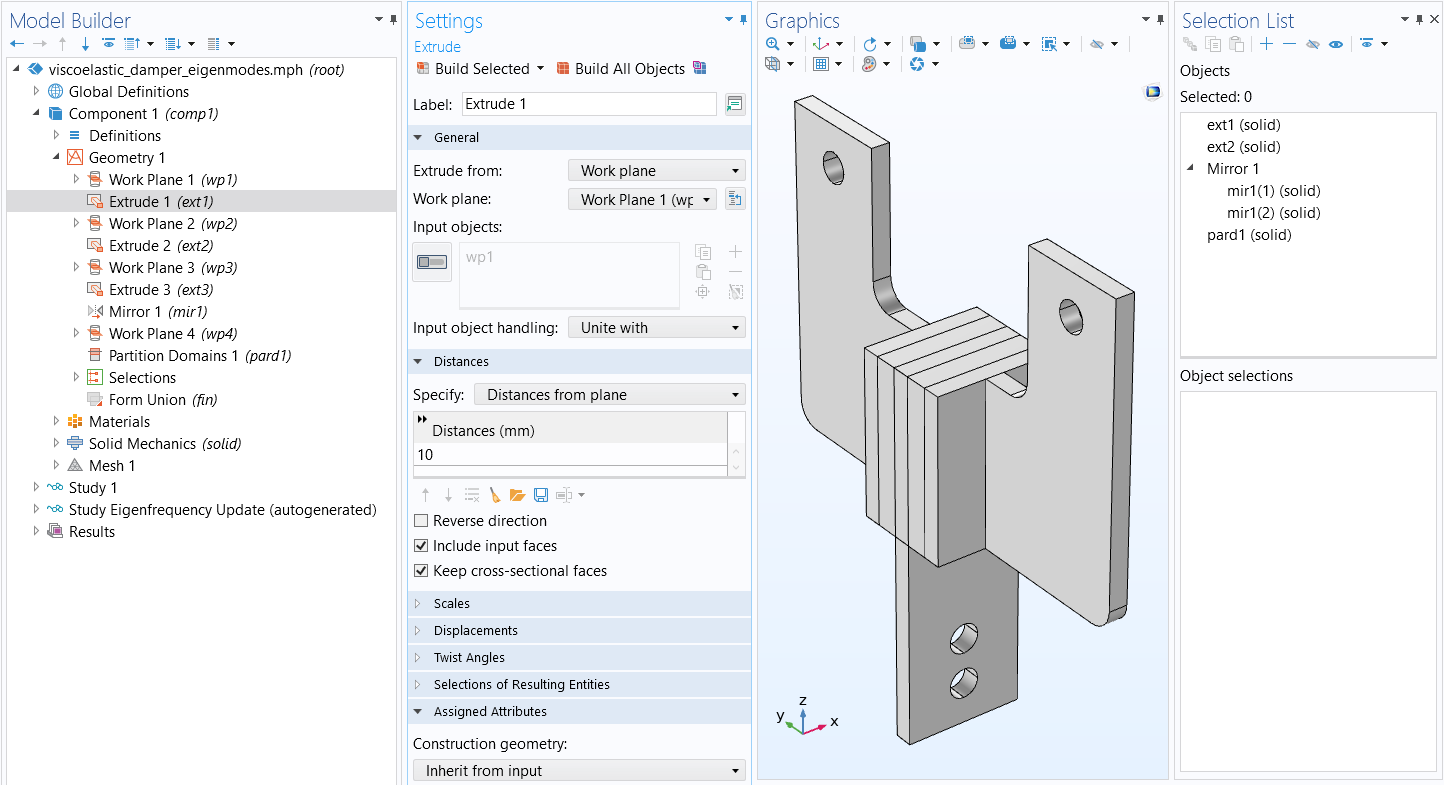 A model of a viscoelastic damper shown in the Graphics window with the corresponding Extrude settings visible as well as the Selection List window with five objects listed.
一个由五个对象组成的几何体,构成了一个黏弹性阻尼器。使用 拉伸算子 将工作平面草图拉伸为实体对象。最后,这些对象以中心板为对称轴进行镜像。该几何图形尚未最终确定。从 选择列表 窗口可以看出,几何中目前有八个几何对象。
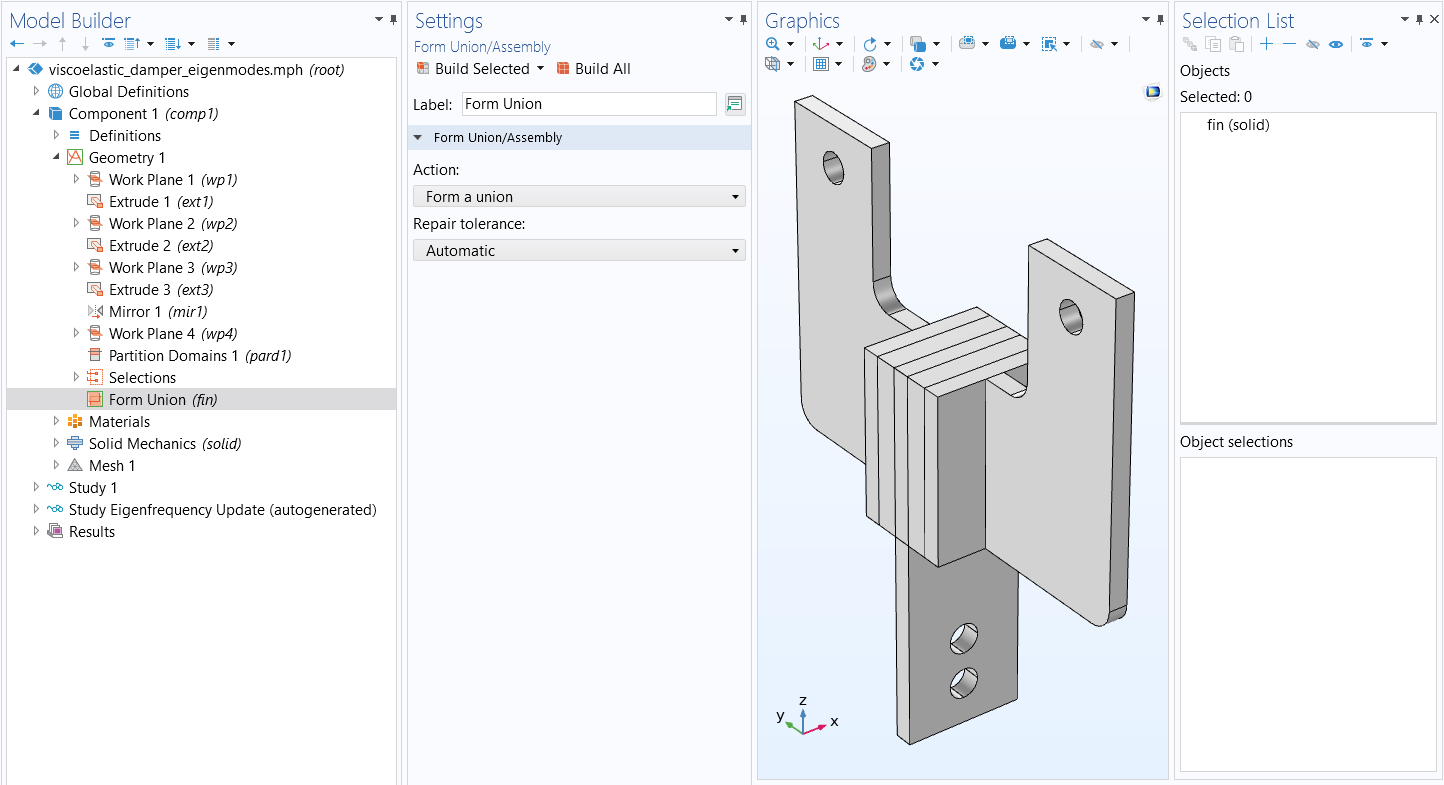 A model of a viscoelastic damper shown in the Graphics window with the Form Union/Form Assembly settings visible as well as the Selection List window with one object listed.
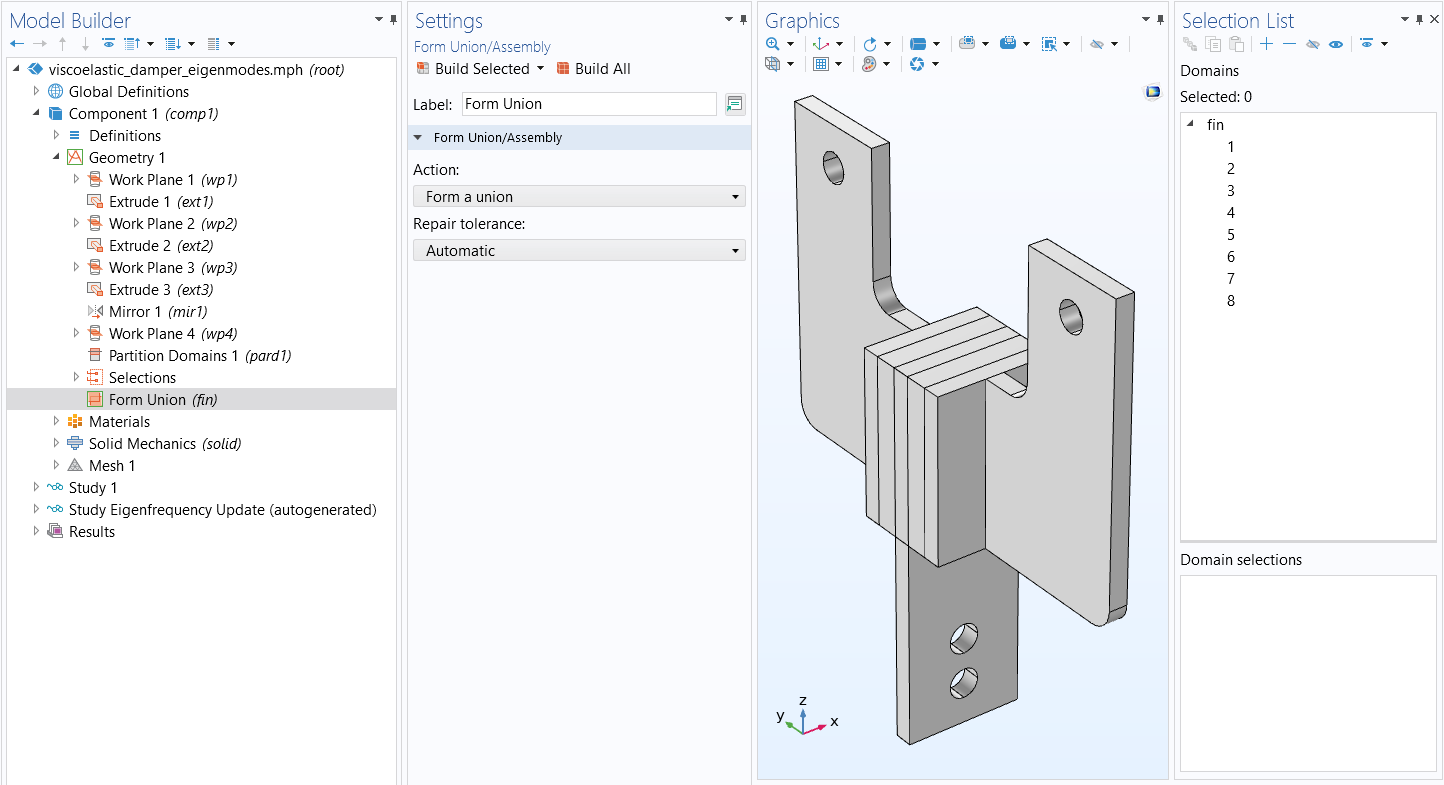 A model of a viscoelastic damper shown in the Graphics window with the Form Union/Assembly settings visible as well as the Selection List window with one object listed.
通过 形成联合体 节点最终确定黏弹性阻尼器的几何。上图:如 选择列表 窗口所示,五个对象已合并为一个对象(翅片)。下图:如 选择列表 中所示,阻尼器现在由八个域组成。
综上所述:
- 在几何序列中,您正在处理几何对象,并在一定程度上引用几何实体。
- 当几何图形最终确定后,您只需在几何实体上指派材料属性、网格设置和物理场定义
几何实体
在指派材料属性、网格设置和物理场定义时,COMSOL Multiphysics® 中用于几何实体(域、边界、边和点)的术语因模型组件的空间维度而异。例如,域始终是模型组件中最高维度的几何实体。因此,对于 3D 几何来说,体积就是一个域。对于 2D 几何,面积就是一个域,而对于 1D 几何,长度就是一个域。您可以从下图中看到术语是如何变化的。
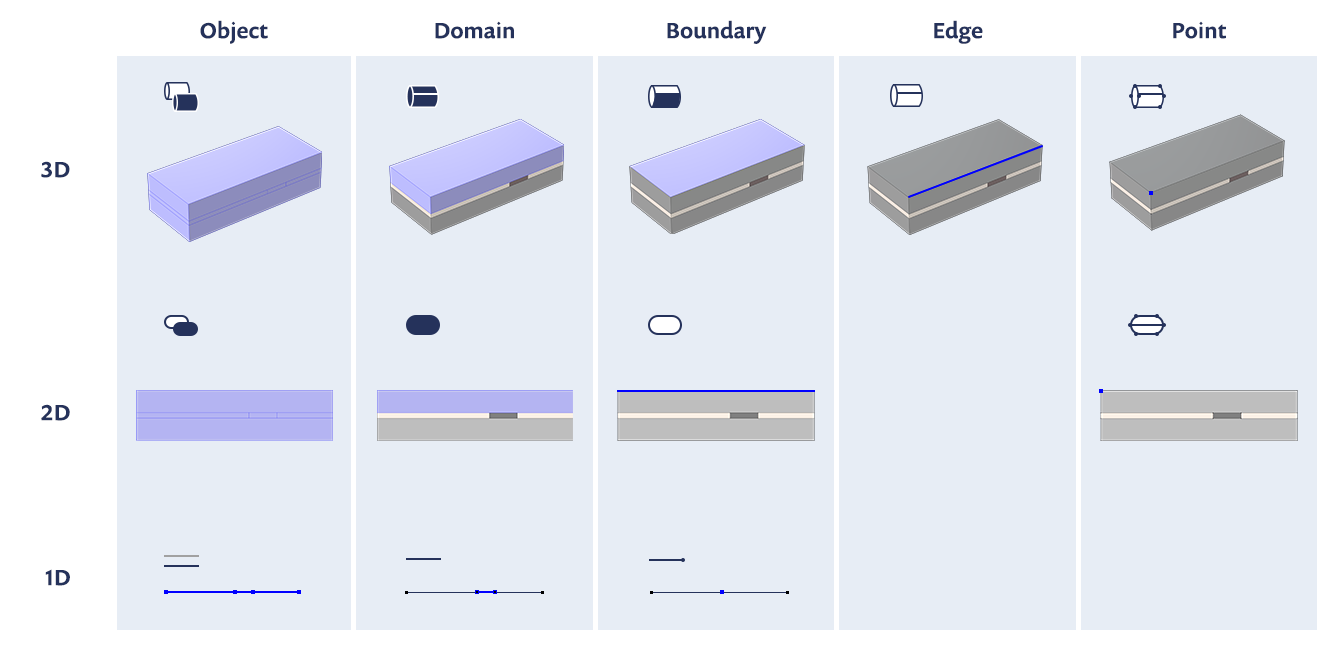 An infographic that is split into five columns, showing how the object, domain, boundary, edge, and point change depending on it being 3D, 2D, or 1D, using a piezoelectric shear-actuated beam as an example.
图表概述了几何实体的命名规则,以及它们如何根据空间维度发生变化。
请注意,只有在 3D 模型中,边才作为几何实体存在。域之后,边界总是次高维度的几何实体。因此,对于 3D 几何来说,表面或面就是边界;对于 2D 几何来说,曲线就是边界;而对于 1D 几何体来说,顶点就是边界。
| 实体维度 | 3D 中的名称 | 2D 中的名称 | 1D 中的名称 | 0D 中的名称 |
|---|---|---|---|---|
| 3D | 域 | 不适用 | 不适用 | 不适用 |
| 2D | 边界 | 域 | 不适用 | 不适用 |
| 1D | 边 | 边界 | 域 | 不适用 |
| 0D | 点 | 点 | 边界 | 域 |
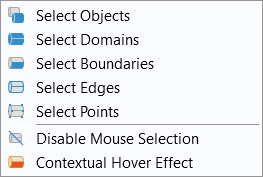
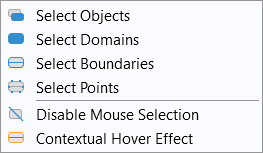
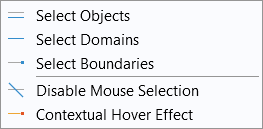
在使用软件时,您通常需要在选择模型几何零件时指定 几何实体层,也就是几何实体的类型(对象、域、边界、边或点)或 层,您可以从中进行几何选择。例如,将 2D 模型中任意节点的 几何实体层 选择设置为 边界,就可以选择任意数量的边。
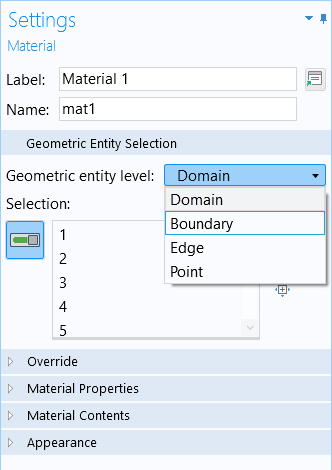
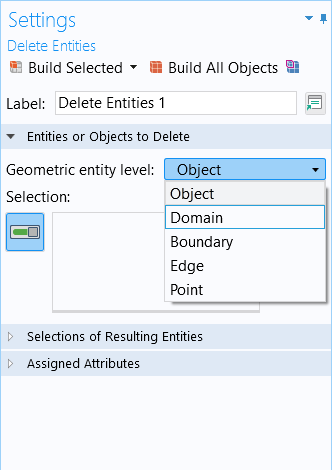
您还可以通过 图形 窗口工具栏上的几何选择按钮,查看每个几何实体层选项的选择内容。几何实体层下拉菜单中的图标也反映了几何名称和实体在空间维度上的变化。每个选项左侧的图标表示每个几何实体的维度。
| 3D | 2D | 1D |
|---|---|---|
 |
 |
 |
要了解关于 COMSOL 中几何命名规则是如何运行及变化的,请观看下方教程视频。
教程视频:COMSOL Multiphysics® 中的几何概念和命名规则
进一步学习
- COMSOL 文档: COMSOL Reference Manual 中 About Geometric Entities 的章节
- 通过索引号识别和选择几何实体
- 选择几何实体
- 形成联合体和形成装配的用法
请提交与此页面相关的反馈,或点击此处联系技术支持。


