
在 COMSOL Multiphysics 中实现 CAD 与网格的无缝融合
Application ID: 149221
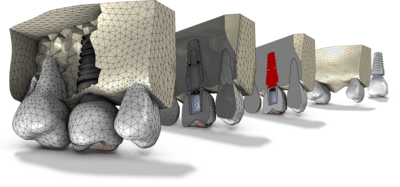
本案例以牙科植入体为例,演示如何在 COMSOL Multiphysics 中将导入的 CAD 模型与 STL 网格进行高效结合。首先在“网格零件”中对 STL 网格进行预处理,随后在“几何序列”中准备导入的 CAD 装配,最终通过“基于网格的几何”序列实现二者的完美融合。
欢迎观看视频教程,了解如何对导入的 STL 文件进行编辑、修复并与 CAD 模型组合。
STL 网格来源于 kbrowne 的 Skull and Eyes - Visible Human Male(1.03 版,NIH 3D,2024 年),https://3d.nih.gov/entries/3DPX-020591,遵循 CC BY 4.0 许可协议开放使用。
案例中展示的此类问题通常可通过以下产品建模:
您可能需要以下相关模块才能创建并运行这个模型,包括:
建模所需的 COMSOL® 产品组合取决于多种因素,包括边界条件、材料属性、物理场接口及零件库,等等。不同模块可能具有相同的特定功能,详情可以查阅技术规格表,推荐您通过免费的试用许可证来确定满足您的建模需求的正确产品组合。如有任何疑问,欢迎咨询 COMSOL 销售和技术支持团队,我们会为您提供满意的答复。


